
Imagine this scenario: a WeChat Official Account you follow (or operate) has accumulated several hundred articles, and you want to preserve them permanently, make them easy to search, and be able to browse them by timeline.
If you did it manually, you would have to open each article one by one, copy, paste, create documents, and sort them... with several hundred articles, a whole day would be gone.
Today, Lawyer Honglin uses AI to automate the entire process.
You only need to tell the AI one sentence, and it will:
• Take the Official Account's articlesand capture them all
• generate a separate Feishu document for each article
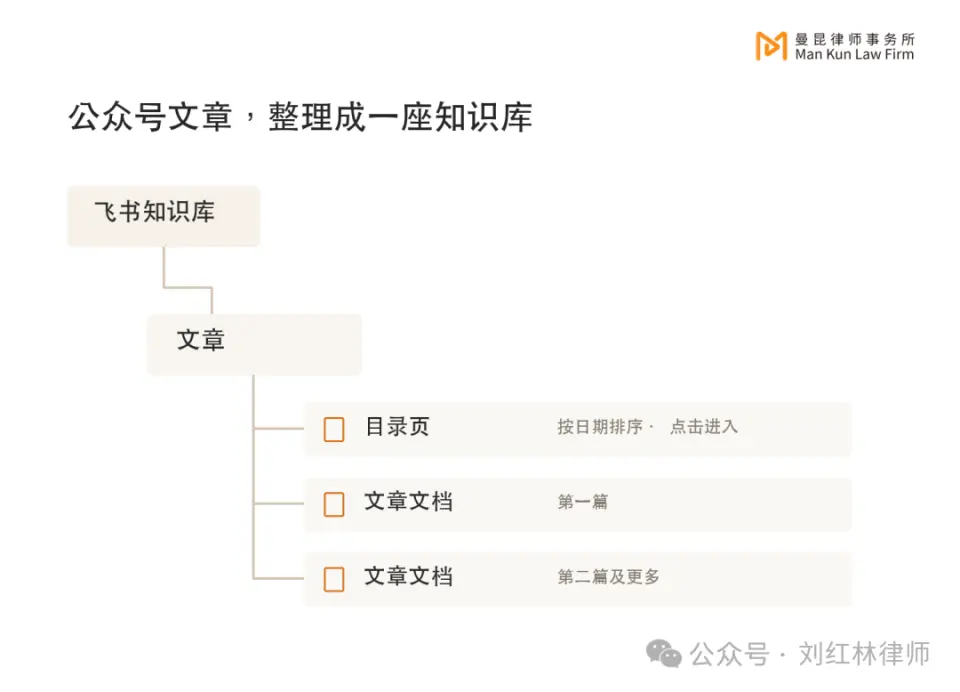
• automatically create atable of contents page sorted by publication date
• be able to, by title,exclude certain articles
The final result looks roughly like this:
Step 1: Find this skill on SkillHub
Open SkillHub and search in the search box for "Batch Import of Official Account Articles into the Feishu Knowledge Base"(slug:wechat-to-feishu-wiki-user-c008dbd9)

The skill has been published to SkillHub
Step 2: Install the skill
On the skill details page in SkillHub, there are two installation methods; choose either one:
Method A: One-click copy for AI installation (simplest)
The details page has a "Copy for AI installation" button. Click it once, then paste the copied content to your AI assistant (such as WorkBuddy), and it will automatically complete the installation.
Method B: Command-line installation
If you are used to using a terminal, copy the installation command on the page and execute it:
skillhub install wechat-to-feishu-wiki-user-c008dbd9
Once installed, the AI has "learned" this capability and can help you with the task at any time.
Step 3: Prepare two small prerequisites
Before this skill can do the work, you need to prepare two things:
- Installed on this device
lark-cliand logged in to Feishu
The skill relies on this to operate your Feishu knowledge base. On first use, simply log in once as prompted (by scanning a QR code or logging in with an account).
- Decide where in the knowledge base the articles should go
Open your Feishu knowledge base, find the page where you want to place the articles, and copy its link. This link tells the skill "put the articles here."
💡 Tip: Under the page you specify, the skill will automatically create an "Article Directory" subpage and several hundred article documents, without touching your existing content.
Step 4: One sentence to start the transfer
Once everything is ready, simply tell the AI what you need. For example:
"Please organize all articles from the WeChat Official Account 'XXX' by publication date into this Feishu knowledge base: https://xxx.feishu.cn/wiki/xxxxx"
The AI automatically runs the entire process: fetching articles → extracting body text → creating documents in bulk → generating a table of contents.
Several hundred articles may take a dozen or so minutes, during which you can go attend to other matters.
It goes through the following steps
1. Fetch the article list: Through the official account's public collection interface, using a "breadth-first search" approach, it follows the collections mentioned in the articles all the way down until there are no new articles. This step does not require logging in.
2. Fetch the body text: Open each article one by one and convert the webpage body text into clean Markdown (preserving headings, paragraphs, bold text, lists, and images).
3. Create documents in bulk: In the Feishu knowledge base, create a separate document for each article. The Feishu interface has rate limits, so the skill has built-in rate limiting and failure retries to ensure that several hundred articles can all be created successfully and reliably.
4. Generate a table of contents: Finally, produce a table-of-contents page sorted by "year → month → date," with each entry being a clickable link that jumps to the corresponding document.
Several common questions
Q: Can all articles from a WeChat Official Account be captured?
Most can. Articles included in collections/topic tags can be enumerated through the public collection API. A small number of very old historical articles that were not included in any collection cannot be captured through the public API—in such cases, the skill will truthfully indicate the scope and will not pretend to have captured "all" of them. If completion is needed, you can open the Official Account article list page in WeChat and copy the link with parameters to the AI.
Q: Will Feishu documents be rate-limited?
Yes, but the skill has already handled this: single-threaded rate limiting plus automatic retry on failure. In actual testing, several hundred articles can all be created successfully, though it takes a little longer.
Q: Can unwanted articles be excluded midway?
Yes. Simply tell the AI the exclusion rules (for example, "exclude any with reading notes in the title"), and it will automatically skip them when creating documents.
Q: Will images in the articles be retained?
Yes. Images in the body text will also be extracted and written into the Feishu document.
Finally
With this skill, "saving Official Account articles to Feishu" has gone from manual labor to a one-sentence task. If you also have an Official Account you want to preserve permanently, you might give it a try.
Skill address: Search "Batch Import of Official Account Articles into Feishu Knowledge Base" on SkillHub
Prerequisite for use: local machinelark-cliLogged in to Feishu